Custom Skin Library Add / TEST License: AUTREX-TEST — Valid until December 29, 2026.
Ana Sayfa Fiyatlandırma İndir Özel Skinler Erken Erişim SSS Uzaktan Kontrol Giriş Yap İndir
TR EN
⚔ Şampiyon ● Çalışıyor Güncellendi: 25 Mayıs 2026

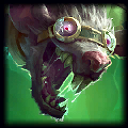
Project: Twitch

P Yapımcı p1mek
20,4B
İndirme
41
Beğeni
59,5B
Görüntülenme
Autrex ile kur
💬 Yorumlar 0

Dosyalar yapımcının kendi kaynağından iner; Autrex sunucularında barındırılmaz.

Açıklama

# Teaser ![](https://i.imgur.com/SXHKWkq.gif) # Preview![](https://x.com/p1mek/status/1981506497785057698 "Teaser") # * [Spotlight](https://x.com/p1mek/status/1981506497785057698 "Spotlight") - prerelease few things changed * [Thread with all updates fixes and features](https://x.com/p1mek/status/1888371884749697312 "Thread with all updates fixes and features")  # Socials *** * Twitter: [https://x.com/p1mek](https://x.com/p1mek) \[Updates on skins] # Mod Information *** * Skin: Default * Description: Wild Rift Import with customized spells Recall and UI # Features * Custom Features or \[Q W E R] * VFXs and Shaders * Loading Screen * Custom UI & HUD on spells * Custom Recall # Bugs *** - all fixed
Nasıl kurulur?

  1. Autrex'i indir ve aç Henüz yoksa indirme sayfasından kur.
  2. Skin Changer → Mod Kütüphanesi Arama kutusuna şunu yaz: Project: Twitch
  3. İndir ve etkinleştir Mod “Yüklü” sekmesine geçer. Maçtan önce “Uygula”ya bas; Autrex modu oyuna ekler.

Elle indirdiysen: Mod Kütüphanesi → “Dosyadan içe aktar” ile .fantome dosyasını seç.